


Sculpt People
4.44.96K Reviews
App Specs
- Version
- 3.3.3.0
- Updated On
- License
- Free
- Downloads
- 100,000,000+
- Developer
- CrazyLabs LTD
- Categories
- Simulation
- Platform
- Android, iOS
Screenshots
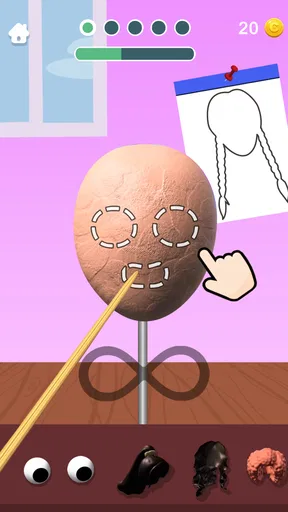
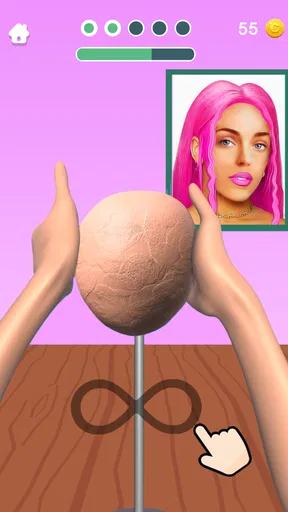
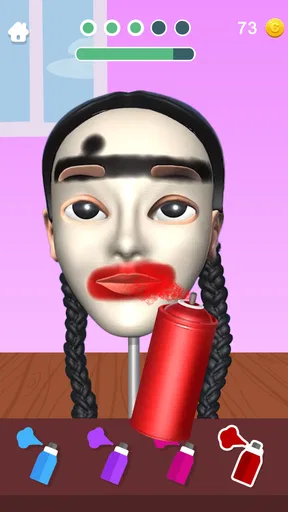
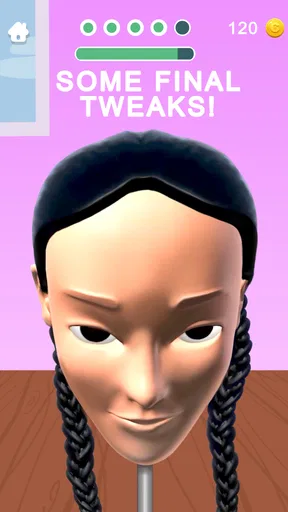

 Analysis by AppCompare
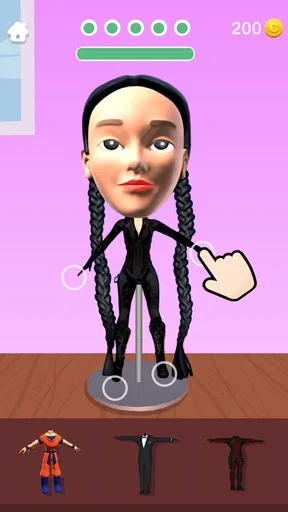
I went into Sculpt People expecting a quick novelty and found a more deliberate little simulation game: the fun comes from making choices about a face, then seeing how those choices change the result. It is less a serious 3D modeling studio than a playful space for experimenting with clay-like forms and facial details. That distinction matters. If you want a relaxed creative activity with a clear visual payoff, it has appeal; if you need precise professional sculpting controls, I would look elsewhere.
What you are deciding as you sculpt
The central pleasure is not simply tapping tools, but deciding what kind of person you want to make. A small change to a nose, the shape of a cheek, or the placement of the eyes can shift a face from recognizable to strange in seconds. I found it more satisfying to work toward a loose idea—friendly, dramatic, odd—than to chase a perfect likeness. That approach keeps experimentation enjoyable rather than turning every adjustment into a test of accuracy.
The game’s face-focused setup gives each session a natural starting point, which is useful when you only have a few spare minutes. You do not need to plan a whole scene or learn a broad modeling workflow before making something. I would still pause before adding details: deciding on the overall expression first helps avoid a face that has lots of decoration but no clear character. A rough concept gives the tools more purpose.
As a mobile simulation game, it sits between a simple drawing toy and a dedicated sculpting program. Drawing apps let me control lines and color directly, while full 3D modeling tools usually ask for more patience and technical learning. Here, the emphasis is on shaping a person and enjoying the transformation. That middle ground is a strength for casual play, though it also means the experience is not aimed at detailed production work.
Where the risk and reward meet
There is a pleasing risk in making a bold edit: an exaggerated feature can give a sculpture personality, but it can also throw off the balance you had worked toward. I learned to make large changes early and save subtle refinements for later. When I did the reverse, I spent time polishing details that a bigger adjustment eventually made feel misplaced. It is a simple workflow choice, but it makes short sessions feel more coherent.
That trade-off is part of the appeal. You can keep a face restrained and readable, or push it toward caricature and accept that it may look awkward before it looks funny. The game works best when I treat odd results as experiments rather than failures. If you are someone who gets frustrated when a creative tool does not produce an exact image in your head, this looser approach may be a drawback; it rewards curiosity more than precision.
For an everyday example, I can imagine opening it while waiting for a friend at a café, choosing a quick character idea, and spending a few minutes adjusting the face until it has a clear mood. I would not start a complicated design in that window. Instead, I would use the short session to test one idea—such as whether a more exaggerated jaw makes the character look confident or comical—and leave the rest alone. That gives the play a small goal without making it feel like homework.
Worth Reading Before You Choose

Baby Panda World Brings Quick Play to Modern Phones, but Its Game Library Feels Busy

ESPN’s Live Game View Makes Following Close Games Easier

QuizzLand Review: A Good Fit for Short Trivia Breaks, Not Every Player

Basketball Stars: Multiplayer Is Fast, but Can It Recover When Matches Go Wrong?

WEBTOON Turns Phone Updates Into a Better Reading Routine

Link to Windows Runs on Shared Habits, Not Social Feeds
Adapting your approach to the result
A useful habit is to judge the whole face after each major change rather than focusing on the feature currently under your finger. A nose can look convincing by itself and still feel wrong in relation to the eyes. Stepping back mentally, even for a moment, helps you notice those relationships. I also found that a deliberately imperfect face can be more expressive than one where every part is treated as a separate polishing task.
This is where the game’s quick, tactile premise has a different rhythm from sketching on a phone. A sketch often rewards repeated lines and shading; sculpting asks you to think in terms of volume and proportion, even when the controls keep things accessible. Compared with a physical lump of clay, the digital approach is cleaner and easier to restart, but it does not give the same hands-on resistance. Compared with a full modeling suite, it asks less of you and offers less control. The right choice depends on whether you want a playful result or a transferable craft workflow.
I would recommend it most to people who enjoy character design, casual visual puzzles, or making silly faces to share with friends. It can also be a nice way to introduce someone to the idea that small proportion changes affect expression. I would skip it if my goal were to sculpt a production-ready character, build an object unrelated to faces, or learn a professional 3D pipeline. A dedicated modeling app is a better fit for those jobs, even if it takes longer to learn.
How it holds attention over time
The long-term question is whether the core activity stays enjoyable after the novelty of shaping a first face wears off. For me, variety has to come from the ideas I bring to each attempt: a different expression, a stranger silhouette, or a more restrained design. That makes it naturally suited to short returns rather than marathon sessions. If you like repeating a familiar process with a new creative twist, it can remain entertaining; if you need a deep progression system to tell you what to do next, the basic premise may feel limited.
I also think it helps to set a stopping point. Without one, it is easy to keep adjusting tiny details without making the result meaningfully better. I usually ask whether the face communicates the mood I wanted. If it does, I stop; if it does not, I make one broad correction instead of endlessly tweaking. This keeps the experience focused and makes each finished attempt feel like a choice, not an accident.
There are practical considerations beyond the sculpting itself. The game is free to download, with optional in-app purchases priced from $1.99 to $4.99 per item, so I would treat purchases as something to consider only after deciding how often I actually play. Its Everyone age rating makes it broadly approachable, though younger players may still benefit from a parent checking how optional purchases are handled on their device. The game was released on October 19, 2020, and its current version is 3.3.3.0; it requires Android 7.0 or later.
CrazyLabs LTD developed the game, which has a 4.4 average from around 546,000 ratings and has been installed over 100 million times. Those figures suggest that the simple, accessible premise has reached a large audience, but they do not tell me whether it matches a particular person’s taste. I would use the scale as context, not as a reason to expect a full-featured art tool. The key decision is still whether face-focused, playful modeling sounds appealing.
First Impressions and User Experience
Upon opening Sculpt People, I was immediately greeted by a vibrant and inviting interface. It’s super user-friendly, which means you don’t have to be a tech wizard to get started. The app walks you through the initial setup with a quick tutorial that’s as entertaining as it is informative. I was sculpting in no time!
The graphics are surprisingly good for a mobile app. The textures and details make the clay look almost real, which adds to the immersive experience. Navigating through the options is a breeze, thanks to the intuitive design. I found myself spending more time than I intended, lost in the world of digital sculpting.
Features That Stand Out
One of the most exciting features is the variety of tools available for sculpting. From chisels to smoothers, the app gives you everything you need to create a masterpiece—or at least a hilarious caricature of your boss. The tools are responsive and mimic real-life counterparts surprisingly well.
Another cool feature is the customization options. You can change the color and texture of your clay, adding a personal touch to your creations. The app also provides a library of eyes, noses, and other facial features that you can mix and match. It’s almost like playing Mr. Potato Head, but with infinitely more possibilities.
Challenges and Learning Curve
While the app is quite intuitive, there are certain advanced techniques that require a bit of practice to master. For instance, achieving symmetry in your sculptures can be a bit tricky if you’re not used to working with clay. However, the app does a great job of providing tips and tricks along the way to help you improve.
One thing I noticed is that the app sometimes struggles with performance on older devices. It’s not a deal-breaker, but there were a few moments where I experienced lag, particularly when my sculpture became more complex. If you’re using a newer device, this shouldn’t be an issue.
Entertainment Factor and Replayability
The entertainment factor is off the charts. Whether you’re recreating famous celebrities or just having fun with random faces, the possibilities are endless. The app also offers challenges and missions, which keep things fresh and give you goals to strive for. This adds a layer of replayability that keeps you coming back for more.
For those who enjoy sharing their creations, the app allows you to easily share your sculptures on social media. It’s fun to see what others think of your work, and it’s a great way to engage with the community of fellow sculptors.
Final Thoughts
Overall, Sculpt People is a delightful app that combines creativity with entertainment. It’s perfect for anyone looking to unwind and explore their artistic side. Whether you’re a seasoned artist or just someone looking to pass the time, this app has something for everyone.
If you’re ready to dive into the world of digital sculpting, give Sculpt People a try. It’s a fun, engaging experience that’s sure to make you smile—and maybe even laugh at some of the wacky faces you create.
Pros
- Intuitive controls make sculpting easy.
- Wide variety of tools and colors.
- Engaging for creative expression.
- Regular updates with new features.
- Suitable for all ages.
Cons
- Limited free features without purchase.
- Occasional lag on older devices.
- Advertisements can be intrusive.
- Requires internet for full functionality.
- No option to save work in progress.
FAQs for Sculpt People
What is the main objective of Sculpt People?
Sculpt People is a creative simulation game where the primary objective is to sculpt lifelike models of people based on customer requests. Players use a variety of tools and materials to shape, mold, and paint their creations, aiming for accuracy and creativity. The game challenges players to meet customer expectations while improving their sculpting skills.
How does the gameplay of Sculpt People work?
In Sculpt People, players choose from different sculpting tools to carve and shape clay into requested designs. Once the basic shape is complete, players can add details and colors to match the customer’s specifications. The game includes various levels of complexity, with each level introducing new challenges and tools to keep the gameplay engaging.
Is Sculpt People suitable for all ages?
Sculpt People is designed to be family-friendly and suitable for players of all ages. The intuitive controls and creative gameplay make it accessible to younger players, while the complexity of later levels offers a challenge for older players. However, parental guidance is recommended for very young users to fully enjoy the game's intricacies.
Does Sculpt People require an internet connection to play?
Sculpt People can be played offline, allowing users to enjoy the game without an internet connection. However, certain features, such as online leaderboards and updates, may require connectivity. Playing online can also offer players access to additional content and community interactions that enhance the overall experience.
Are there in-app purchases in Sculpt People?
Yes, Sculpt People includes in-app purchases that allow players to buy additional tools, materials, and customization options. While the game is free to download and play, these purchases can enhance the experience by providing more creative freedom and reducing wait times. Players can enjoy the game fully without spending money, but these options are available for those looking to expand their gameplay.


